

Support and resistance are the backbone of technical analysis. Traders spend hours marking levels manually, but with our Best Auto Support and Resistance Indicator TradingView (2025), you can simplify the process and trade with confidence.
In this blog, we’ll explore the best auto support and resistance indicator for TradingView – the AlgoFlux SwingX Pro, why it stands out, and how you can use it effectively.
🔥 Why Support and Resistance Matter
- Identify key price levels where reversals or breakouts occur.
- Plan entries and exits with higher accuracy.
- Set stop loss & targets based on real swing levels.
- Filter false signals and improve your R-multiple trades.
✅ Best Auto Support and Resistance Indicator for TradingView – SwingX Pro
The SwingX Pro by AlgoFlux Indicator automatically detects support and resistance zones on multiple timeframes. Unlike free scripts, it:
- Draws dynamic support & resistance levels in real-time.
- Adapts to multi-timeframe analysis (Daily + 2H).
- Works with EMA, RSI, MACD & volume filters.
- Supports swing trading with fixed/dynamic SL & TP.
- Integrates with a mini dashboard for live trade conditions.
🆚 Auto vs Manual Support & Resistance
| Feature | Manual Drawing | AlgoFlux SwingX Pro |
|---|---|---|
| Time | Time-consuming | Instant auto-plot |
| Accuracy | Subjective | Rule-based & consistent |
| Multi-Timeframe | Hard to track | Auto-calculated |
| Alerts | Not available | Built-in alerts |
| Dashboard | No | Yes |
Clearly, SwingX Pro saves time, increases accuracy, and boosts profitability.
Start Trading with the SwingX Pro Indicator
Get instant buy and sell signals on TradingView using our Auto Support and Resistance Indicator TradingView.
Buy SwingX Pro Now📊 Key Features of AlgoFlux Auto Support & Resistance Indicator
- Auto-detects major & minor levels.
- Dynamic support & resistance chart (updates live).
- Best buy/sell signals for swing trading.
- Multi-timeframe confluence (more reliable trades).
- Optimized for NSE & Global Markets.
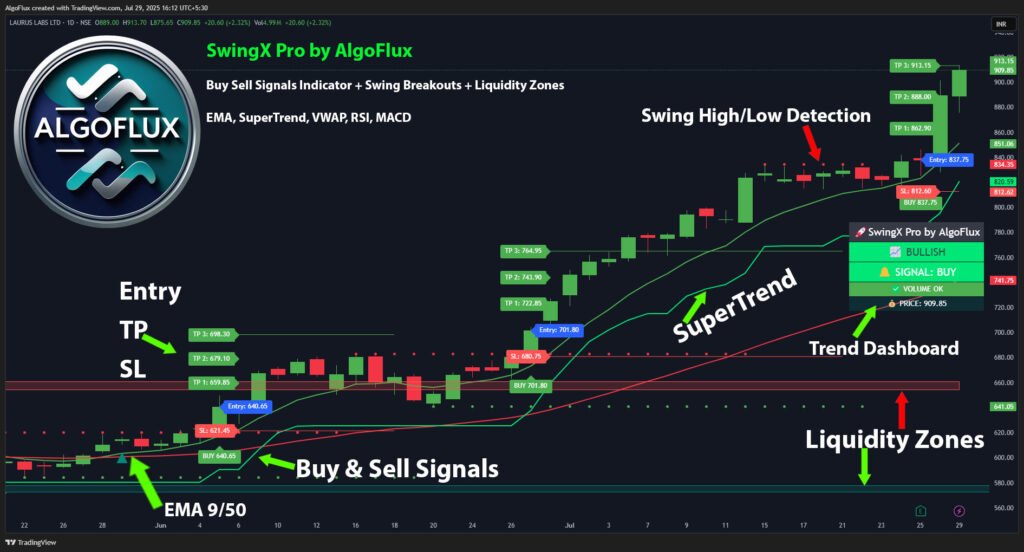
🚀 SwingX Pro TradingView Indicator
Accurate non-repainting buy and sell signals with automated alerts and dashboard.
Buy Now – Instant AccessWhat is an Auto Support and Resistance Indicator TradingView?
An Auto Support and Resistance Indicator TradingView automatically identifies key price levels where markets tend to react. Instead of manually drawing horizontal lines, the indicator detects swing highs and lows and plots them as dynamic zones.
Traders searching for the best support and resistance indicator TradingView often prefer automated tools because they remove subjectivity and improve analysis speed.
Both free and premium tools exist, including SwingX Pro by AlgoFlux TradingView Indicator, which enhances support and resistance with additional confirmation signals and risk management features.
⚙️ How Auto Support and Resistance Indicators Work
A typical support and resistance indicator TradingView free version uses:
- Pivot point detection
- Historical price clustering
- Touch count analysis
More advanced tools such as SwingX Pro by AlgoFlux TradingView Indicator go a step further by combining:
- Trend filters
- Momentum confirmation
- Buy/sell signals with stop-loss and target levels
This multi-layered logic helps traders avoid false breakouts and focus only on high-probability zones.
🧭 Step-by-Step Strategy Using Auto Support & Resistance
Step 1: Load an Indicator
Apply a best auto support and resistance indicator TradingView free or premium version to your chart.
Step 2: Identify Major Zones
Let the indicator plot strong support and resistance automatically.
Step 3: Wait for Confirmation
Use:
- RSI divergence
- Volume spikes
- Or signals from SwingX Pro by AlgoFlux TradingView Indicator
Step 4: Enter Near Strong Zones
Buy near support and sell near resistance when confirmation appears.
Step 5: Manage Risk
Set stop loss below support or above resistance, or use the built-in risk levels provided by SwingX Pro.
📊 Real Trade Example Using SwingX Pro
Example setup:
- Indicator: SwingX Pro + Auto Support/Resistance
- Entry: Bullish signal at support zone
- Stop Loss: Auto-calculated by indicator
- Exit: Resistance target
Result:
📈 Trade moved +9% within 4 sessions
This demonstrates how combining a best support resistance indicator TradingView with a structured signal system improves consistency.
✅ Benefits of Auto Support & Resistance Indicators
- Automatically detects key price zones
- Saves time compared to manual drawing
- Improves consistency across timeframes
- Works well for intraday and swing trading
When paired with SwingX Pro by AlgoFlux TradingView Indicator, traders also gain:
- Real-time alerts
- Non-repainting signals
- Built-in stop-loss and targets
⚠️ Limitations
Even the best free support and resistance indicator TradingView can struggle during:
- High-volatility news events
- Strong breakout trends
This is why professional traders often combine these indicators with trend and momentum tools.
⚙️ Best Settings for Support & Resistance Indicators
Recommended configuration:
| Setting | Suggested Value |
| Pivot length | 5–10 |
| Minimum touches | 2 |
| Zone width | Medium |
| Lookback | 200 candles |
SwingX Pro automatically optimizes many of these parameters internally, reducing manual configuration.
❌ Common Mistakes Traders Make
- Trading every support/resistance touch
- Ignoring higher timeframe levels
- Using free indicators without confirmation
- Entering before candle close
🆚 Comparison: Free Indicators vs SwingX Pro
| Feature | Free Indicator | SwingX Pro |
| Auto support/resistance | Yes | Yes |
| Buy/sell signals | No | Yes |
| Stop-loss & targets | No | Yes |
| Alerts | Limited | Advanced |
| Non-repaint logic | Not always | Yes |
This is why many traders searching for the best auto support and resistance indicator TradingView eventually migrate to multi-signal systems like SwingX Pro.
Explore more TradingView Indicators.
- Learn about the Best Swing Trading Indicator for TradingView – SwingX Pro.
- Check our TradingView Support & Resistance Indicators.
- Brand page: AlgoFlux TradingView Indicator.
👉 Want to Buy?
Follow us on TradingView and DM us – AlgoFlux.
📌 FAQ – Best Auto Support & Resistance Indicator TradingView
What is the best support and resistance indicator on TradingView?
The AlgoFlux SwingX Pro is the best because it auto-plots dynamic levels, works on multi-timeframes, and integrates buy/sell logic.
Is there a free support & resistance indicator on TradingView?
Yes, but free versions lack accuracy and advanced features like alerts, dashboards, and swing logic.
Can auto support & resistance improve trading accuracy?
Yes ✅ It reduces manual errors, filters noise, and helps traders catch breakouts and reversals faster.
Does SwingX Pro work for all markets?
Yes, it works for stocks, forex, crypto, and indices on TradingView.
Are free support and resistance indicators reliable?
Yes, but they often lack risk management and confirmation features found in premium indicators.
Does SwingX Pro include support and resistance detection?
Yes, SwingX Pro integrates dynamic level detection with buy/sell signals and risk management.
Can beginners use auto support and resistance indicators?
Yes, automated tools simplify chart reading and help beginners identify important price zones easily.
🎯 Conclusion
The best auto support and resistance indicator on TradingView is none other than the AlgoFlux SwingX Pro.
With real-time auto levels, swing entries, and dashboard stats, it gives traders the edge they need.
👉 Start using SwingX Pro today and trade like a pro!
